ChatGPT Intelligent UI explained: what it is, examples and what it could change
OpenAI's GPT-6 can answer in ChatGPT with buttons, charts and small tools instead of a paragraph. What Intelligent UI is, how OpenAI says it works, three working mock-ups of my own, what it could change for the AI race and for stores, and what the announcement does not say.
On October 7, 2026, OpenAI said that GPT-6 in ChatGPT can answer with an interface instead of a paragraph: buttons, forms, charts and small tools that you use right in the conversation. It calls this Intelligent UI. Of everything in the launch it is the part I find most interesting, and I think it could matter as much for the AI race as the model underneath it. This article explains what it is, how OpenAI says it works and what I think it could change.
I am writing a day after the announcement, from OpenAI’s own post, GPT-6 and Intelligent UI for everyone. I have not used Intelligent UI, so I cannot tell you how it feels. What I can do is show the idea. The pictures and the three working mock-ups are mine, not ChatGPT’s, and, as on the rest of this site, all of it was written by an agent, with the tests as the gate.
ChatGPT Intelligent UI is a capability of GPT-6 in ChatGPT that lets it answer with an interface, not only with text. OpenAI says the model composes a response from text, visuals and interactive elements, and chooses how they fit together based on your question.
Announced: October 7, 2026, together with GPT-6 in ChatGPT.
What it can show: graphics, tappable buttons, forms, charts and tools you use inside the conversation.
How it chooses: the format follows the question. A comparison might go side by side, an explanation might become an interactive diagram, and when plain text is the most useful answer, ChatGPT can still give plain text.
Who gets it: a global rollout in the Chat tab, to Plus, Pro, Business and Enterprise from October 7 and to Free and Go from October 8. Enterprise depends on workplace admin settings.
Models: GPT-6 Sol on Plus, Pro, Business and Enterprise, and GPT-6 Luna on Free and Go.
Not included: the models behind Work and Codex do not change in this release.
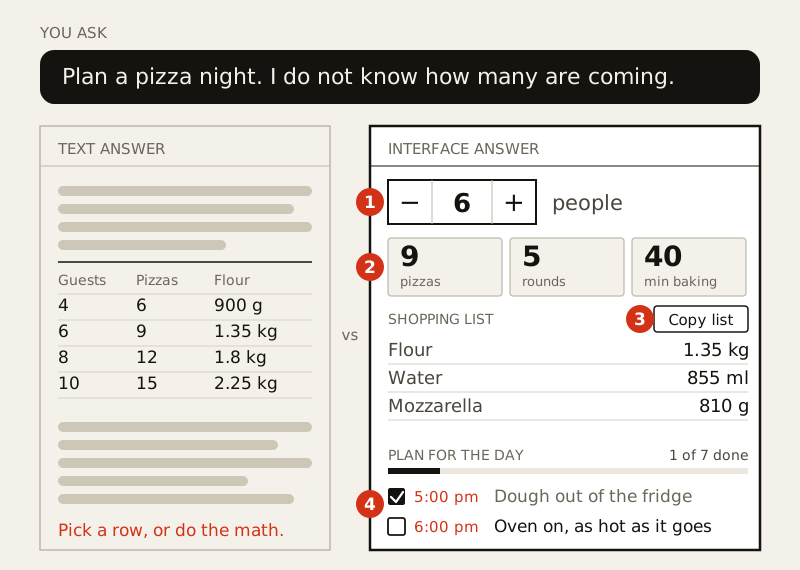
Like a small app that appeared in the chat. OpenAI’s own example is a Sunday lamb roast for friends when the number of guests is not settled. The text answer is complete and includes a table by headcount. The Intelligent UI answer has a stepper for the number of people, shopping quantities that recalculate, a button that copies the list and a cooking checklist with times.
I rebuilt that shape with a pizza night, because I can check the arithmetic. In the text you pick a row and do the math in between. In the interface the number is a control, the list and the oven time follow it, the list copies in one tap and the checklist keeps your place.
My illustration, not a ChatGPT screenshot: 1 the number is a control, 2 the list follows it, 3 copy in one tap, 4 the plan keeps your place.
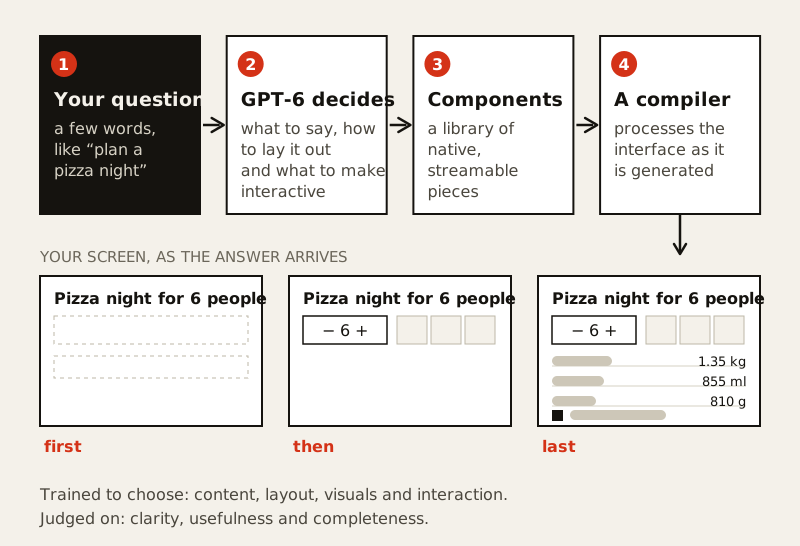
OpenAI describes two pieces. The first is a library of native, streamable components, which gives each response a familiar design foundation and leaves the model room to decide how the pieces fit together. The second is a compiler that processes the interface as the model generates it, so the interface appears progressively and does not wait for the whole response. OpenAI’s point is that the first part of an answer can be on your screen while the model is still writing the rest.
On the model side, OpenAI says it expanded its training so GPT-6 makes decisions about content, layout, visuals and interaction, and that it evaluated the interfaces for clarity, usefulness and completeness. GPT-6 also learned, the post says, when to use interactivity and when a simple text response is enough. The post does not list the components, say how the model chooses among them or describe the evaluation beyond clarity, usefulness and completeness. I would like to know all three.
My reading of OpenAI's description in words. OpenAI did not publish a diagram, so the steps and their order are mine.
A separate feature arrived in the same release: ChatGPT can now start answering while it keeps thinking. OpenAI says GPT-6 Instant starts answering 44 percent sooner, on average, than GPT-5.6 Instant on questions that need web search.
A Sunday roast plan, building a wardrobe, planning a road trip on a map
A plan you can adjust, or a map with the stops
Learning something hard
The central limit theorem, GDP, drone photography, the Monty Hall problem
An explanation you can explore: change an input and see what happens
A tool, just by asking
A bill splitter, a retirement savings calculator, a retro game
A small tool built for the task in front of you
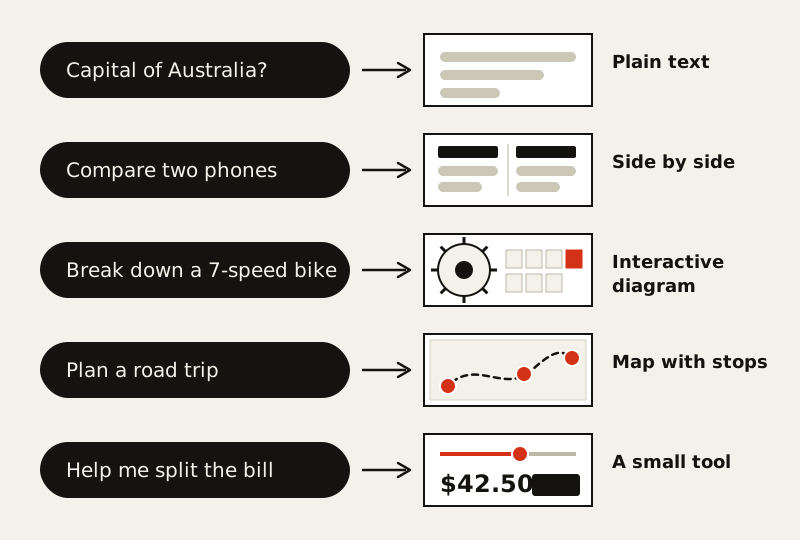
OpenAI says the format depends on the question. The post also opens with a 7-speed bike, broken down by part. Here are five questions and the shape each could get.
The bike, the road trip and the bill splitter are from OpenAI's post. The other two questions are mine.
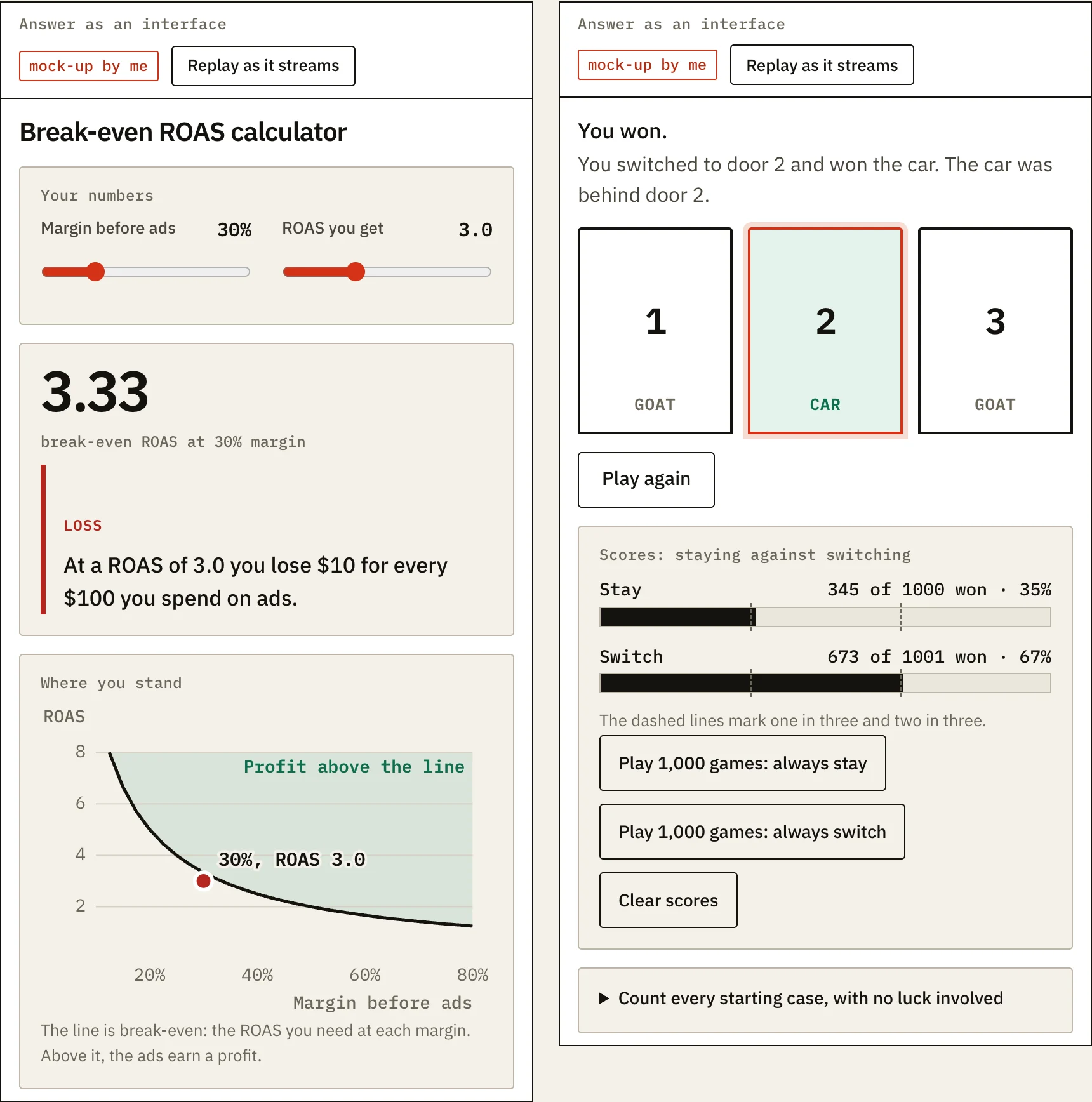
Yes. I built three mock-ups: a pizza night plan, a break-even ROAS calculator and the Monty Hall problem. Each one is shown as a text answer and as an interface you can use. They are not ChatGPT’s components, no model runs behind them, and their arithmetic has tests. I have not cooked from the pizza recipe, so the dough is a mock-up too.
Building them taught me three things.
An interface has to commit. A paragraph can say about 40 minutes and move on. A calculator needs its assumptions, here eight minutes a round and two trays, and it has to show them, or the component hides them.
The work was in the arithmetic. The layout took less time than getting the numbers right and testing them.
The text answers were hard to beat on honesty. You can read every step of a paragraph. In an interface you trust the slider.
Two of my mock-ups, as real screenshots. At a 30 percent margin, a ROAS of 3.0 loses money, and switching wins about two games in three.
Because it changes what an answer is, who builds the interface and what assistants compete on. This part is my opinion, not OpenAI’s.
What changes
Before
With Intelligent UI
What you get
A paragraph, sometimes a table
An interface you can use
Who builds the interface
A developer, ahead of time
The model, for each question
What you do
Read, then do the math somewhere else
Change a number and watch the rest follow
What assistants compete on
Intelligence and speed
Those, plus design judgment
The answer becomes something you operate. A text answer is read. An interface answer holds state, takes input and shows consequences. OpenAI’s own phrase is that ChatGPT can combine UI, data and actions. If that holds up, a chat stops being a transcript and becomes a workspace.
The interface becomes the answer itself. Small interactive tools are not new: Anthropic’s help page for Claude artifacts lists them among what Claude can make, opening beside the conversation. What OpenAI describes sits inside the conversation, chosen by the model for each question, in a product it says more than 1.2 billion people use each week.
Design judgment becomes a competing skill. Much of the contest so far has been about intelligence and speed. When the answer is an interface, taste matters: which controls, how many, and when to stay plain. OpenAI says there is still work ahead on the model’s design judgment. That is a new thing to be good or bad at, and it does not fit in a benchmark table.
Small tools get a new competitor. A bill splitter, a unit converter or a break-even calculator often exist as sites and apps because a developer had to build the interface ahead of time. When the interface can be made per question, the answer itself competes with them. I would watch the how-much, how-many and which-one queries first.
Correctness gets harder to see. OpenAI says it judged interfaces on clarity, usefulness and completeness. A calculator can be all three and still use the wrong formula. My mock-ups have tests for that reason, and I would check a generated tool the way I check a spreadsheet someone sends me.
OpenAI’s closing line is the thesis: “Instead of people adapting to software, software will adapt to people.” One post cannot show whether that happens.
I do not know. The post says nothing about product shopping, checkout or ads, so these are things I would watch, not findings.
Product answers built from your data. If a comparison or a size guide is composed per question, it is composed from what the assistant can read about your products. That makes your feed, your structured data and the text on your product pages the raw material of the answer, as I wrote in the AI shopping assistants article.
What you can measure. A tapped filter or a copied list happens inside ChatGPT. Nothing in the post says it reaches your analytics, so I would assume it does not until someone shows otherwise.
Where ads fit. The post does not say how ads would sit next to an interface. My article on ChatGPT Ads measurement covers what OpenAI announced for ads two days earlier.
The cheapest first step is dull: ask ChatGPT the questions your customers ask, read what it says about your products, and fix what is wrong at the source.
The API. The post is about the Chat tab and does not mention the API or any way for developers to use Intelligent UI. OpenAI’s model guide for the GPT-6 family from October 2 does not mention it either, but it is written for API and Codex users, so that proves little. The short answer is also in the FAQ.
Accessibility. I found nothing on screen readers, keyboard use or exporting an interface. Building my mock-ups, I had to work on screen readers and keyboard use, and neither is free.
The evidence. The 44 percent figure comes with no method. Nothing in the post lets me check it.
Control. The post says ChatGPT can give plain text when that is the most useful answer. It does not say whether you can ask for plain text, or switch the interfaces off. For Enterprise, it says availability depends on workplace admin settings.
The limits. The post does not say what the component library cannot do, or what happens when the model picks a poor interface.
What I keep coming back to is how ordinary the examples are: a dinner, a bill, a puzzle. In a chat, each of them has usually come back as a paragraph, and the tool for it lives somewhere else. If an interface is now as cheap to make as a paragraph, I do not see why these should keep coming back as paragraphs. Building three small ones taught me that the quality lives in the arithmetic, not the layout. It is one day old, my main source is OpenAI’s own post, and I have not used it, so take my enthusiasm for what it is. A calculator that appears exactly when you need it is hard to dislike. A calculator that is wrong with great confidence is worse than a paragraph.
Google's Gemini Decisions API, introduced on November 11, 2026, scores a fixed set of answers instead of writing text, in about 200 ms. What it is, what it costs, how Google's lead holds up against Artificial Analysis's own run, how to pair it with an LLM, and where a business could use it.
Mistral Large 4 (Le Chonk) is a model of about 1 trillion parameters whose weights Mistral released on October 29, 2026. What it is, what its license allows, what it costs to use and run, how the top open-weight claim holds up against Artificial Analysis's own runs, and where it could help.
Mistral's Timestral is a family of time-series models that forecast with a range, not one number. What it is, what it does, what its revenue-limited license allows, what I could and could not check in its benchmark claims, and where it could help e-commerce, tech and marketing.